> ## Documentation Index
> Fetch the complete documentation index at: https://stackone-hub-docs-confluence-api-token-update.mintlify.site/llms.txt
> Use this file to discover all available pages before exploring further.

# Airship

> Follow these steps to connect Airship with StackOne Hub successfully.

<Warning>
  Ensure you have Admin privileges for your Airship account.
</Warning>

If you've been directed to StackOne to integrate with Airship, the following steps will help you understand the process and any necessary actions to configure successful integration.

## Find your Airship region (EU or US)

<Steps>
  <Step title="Login to Airship">
    Login to your Airship tenant.

    Check your browser's URL bar. The URL will indicate which region you are on:
    `https://go.urbanairship.com` - US
    `https://go.airship.eu/` - EU

    <Frame>
      <img className="rounded-md" style={{ margin: '0 auto', border: '1px solid #efefef' }} alt="Airship Region" src="https://mintcdn.com/stackone-hub-docs-confluence-api-token-update/zHY41-o1JHEiZkNS/images/airship/image1.png?fit=max&auto=format&n=zHY41-o1JHEiZkNS&q=85&s=95f295328756d563d48abd967c659171" width="229" height="45" data-path="images/airship/image1.png" />
    </Frame>
  </Step>
</Steps>

## Retrieve your App Key

<Steps>
  <Step title="Select Project">
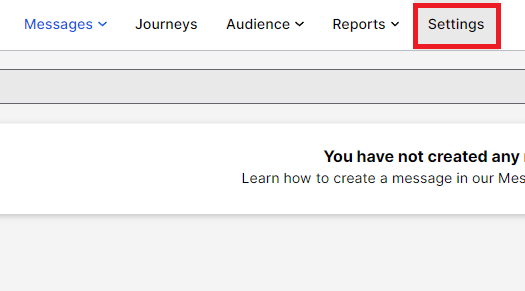
    Select the project you want to connect.
    <Frame>
      <img className="rounded-md" style={{ margin: '0 auto', border: '1px solid #efefef' }} alt="Select Project" src="https://mintcdn.com/stackone-hub-docs-confluence-api-token-update/zHY41-o1JHEiZkNS/images/airship/image2.png?fit=max&auto=format&n=zHY41-o1JHEiZkNS&q=85&s=7b5eceb94501baa67442dad060856ee0" width="612" height="389" data-path="images/airship/image2.png" />
    </Frame>
  </Step>

  <Step title="Select Settings">
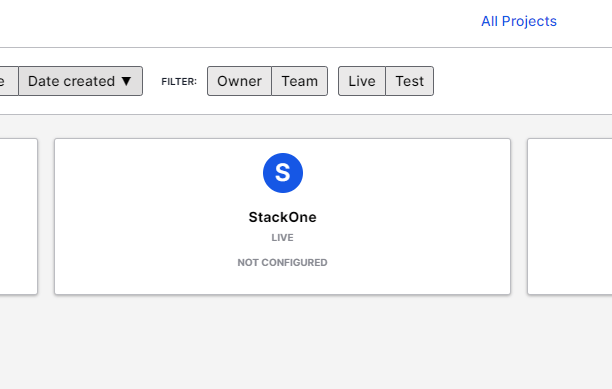
    Select Settings.

    <Frame>
      <img className="rounded-md" style={{ margin: '0 auto', border: '1px solid #efefef' }} alt="Select Settings" src="https://mintcdn.com/stackone-hub-docs-confluence-api-token-update/zHY41-o1JHEiZkNS/images/airship/image3.png?fit=max&auto=format&n=zHY41-o1JHEiZkNS&q=85&s=096ce0c2f02140a972dc482a5ead9b84" width="525" height="291" data-path="images/airship/image3.png" />
    </Frame>
  </Step>

  <Step title="Copy App Key">
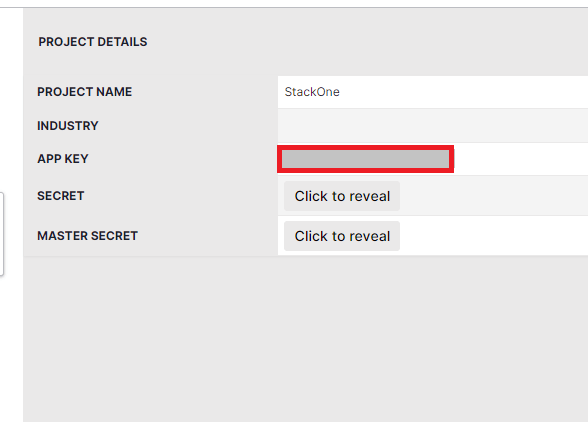
    Within Project Details on the right side, copy the App Key.
    <Frame>
      <img className="rounded-md" style={{ margin: '0 auto', border: '1px solid #efefef' }} alt="App Key" src="https://mintcdn.com/stackone-hub-docs-confluence-api-token-update/zHY41-o1JHEiZkNS/images/airship/image4.png?fit=max&auto=format&n=zHY41-o1JHEiZkNS&q=85&s=9dcfa78dae3dc9f7720ffcadf88abae6" width="588" height="422" data-path="images/airship/image4.png" />
    </Frame>
  </Step>
</Steps>

## Retrieve your Master Secret

<Steps>
  <Step title="Reveal Master Secret">
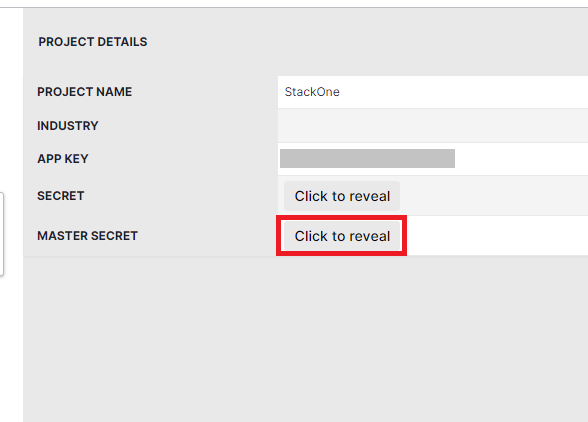
    Within the Project Details panel, select "Click to reveal" next to Master Secret.
    <Frame>
      <img className="rounded-md" style={{ margin: '0 auto', border: '1px solid #efefef' }} alt="Reveal Master Secret" src="https://mintcdn.com/stackone-hub-docs-confluence-api-token-update/zHY41-o1JHEiZkNS/images/airship/image5.png?fit=max&auto=format&n=zHY41-o1JHEiZkNS&q=85&s=a28ca9438d757eace3251287867d7b14" width="588" height="422" data-path="images/airship/image5.png" />
    </Frame>
  </Step>

  <Step title="Copy Master Secret">
    Copy the contents of Master Secret.
  </Step>
</Steps>

## Input the collected inputs into the StackOne hub

<Steps>
  <Step title="Enter the Details">
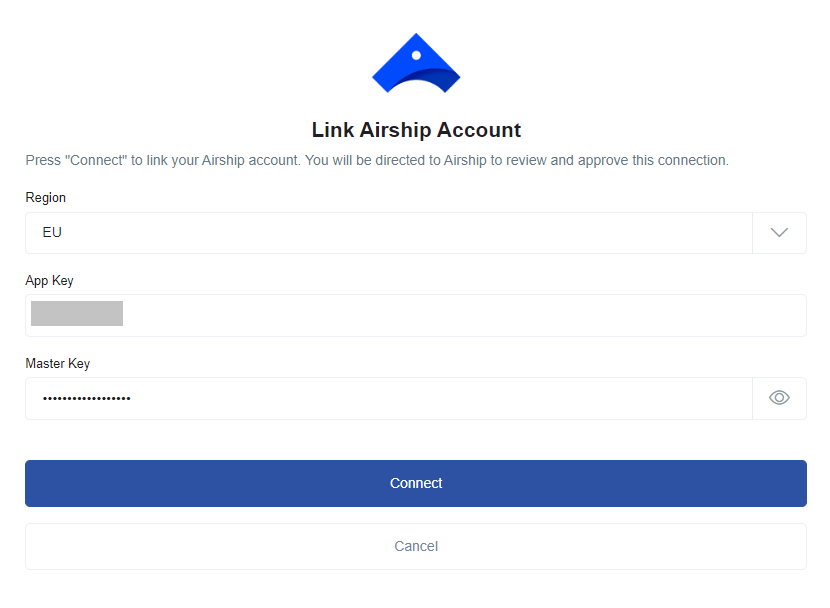
    On the link account page, enter the details you have collected and click the `Connect` button.
    <Frame>
      <img className="rounded-md" style={{ margin: '0 auto', border: '1px solid #efefef' }} alt="Link Account" src="https://mintcdn.com/stackone-hub-docs-confluence-api-token-update/zHY41-o1JHEiZkNS/images/airship/image6.png?fit=max&auto=format&n=zHY41-o1JHEiZkNS&q=85&s=9dcf29cc5ffcaafae3fa239ef40edd0b" width="830" height="608" data-path="images/airship/image6.png" />
    </Frame>
  </Step>
</Steps>

<br />

Congratulations, you're all set! If you face any issues with the steps mentioned above,
please contact us by emailing [integrations@stackone.com](mailto:integrations@stackone.com). We're always here to assist you!