> ## Documentation Index
> Fetch the complete documentation index at: https://stackone-hub-docs-confluence-api-token-update.mintlify.site/llms.txt
> Use this file to discover all available pages before exploring further.

# JazzHR

> Follow these steps to connect JazzHR with StackOne Hub successfully.

<Warning>
  Ensure you have Admin privileges for your JazzHR account.
</Warning>

If you've been directed to StackOne to integrate with JazzHR, the following steps will help you understand the process and any necessary actions to configure successful integration.

## Getting the API key

<Steps>
  <Step title="Open Settings">
    After login, click on Settings which will direct you to the settings page.

    <Frame>
      <img className="rounded-md" style={{ margin: '0 auto', border: '1px solid #efefef' }} alt="Settings Page" src="https://mintcdn.com/stackone-hub-docs-confluence-api-token-update/gCnVSZzD28kSlWtw/images/jazzhr/image1.png?fit=max&auto=format&n=gCnVSZzD28kSlWtw&q=85&s=8349b54dd8d309f58e9114a0b64fd87f" width="1159" height="67" data-path="images/jazzhr/image1.png" />
    </Frame>
  </Step>

  <Step title="Navigate to Integrations">
    Once you are directed to Settings, click on the Integrations tab in the subheader.

    <Frame>
      <img className="rounded-md" style={{ margin: '0 auto', border: '1px solid #efefef' }} alt="Integrations Tab" src="https://mintcdn.com/stackone-hub-docs-confluence-api-token-update/gCnVSZzD28kSlWtw/images/jazzhr/image2.png?fit=max&auto=format&n=gCnVSZzD28kSlWtw&q=85&s=a48390be36fb614b71a07e0cd099c798" width="1147" height="177" data-path="images/jazzhr/image2.png" />
    </Frame>
  </Step>

  <Step title="Locate API Key">
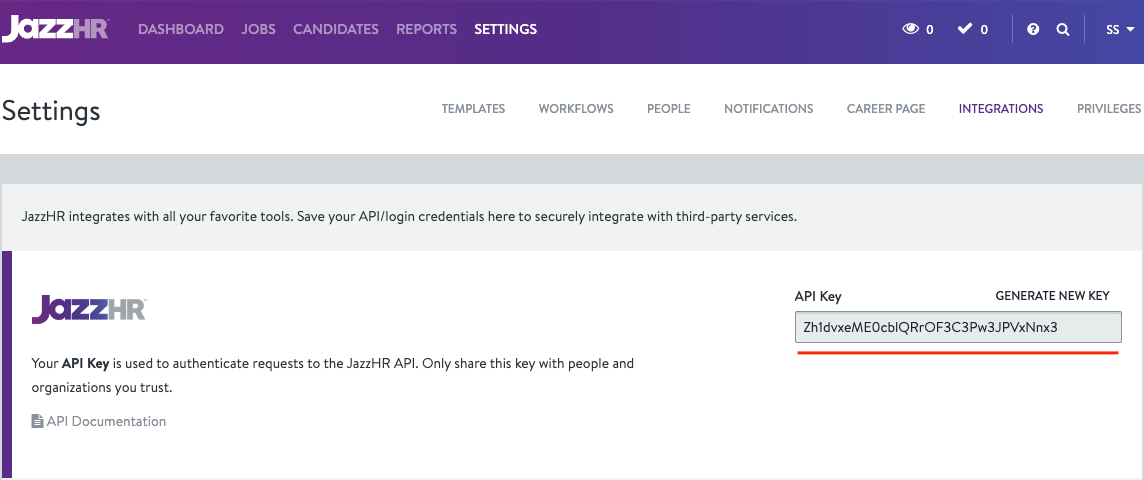
    Once you are directed to the Integrations page, you’ll find the auto-generated API key in the first section.
    <Frame>
      <img className="rounded-md" style={{ margin: '0 auto', border: '1px solid #efefef' }} alt="API Key Section" src="https://mintcdn.com/stackone-hub-docs-confluence-api-token-update/gCnVSZzD28kSlWtw/images/jazzhr/image3.png?fit=max&auto=format&n=gCnVSZzD28kSlWtw&q=85&s=685430ff8bea70b5ddfcde950a02ba53" width="1144" height="480" data-path="images/jazzhr/image3.png" />
    </Frame>
  </Step>
</Steps>

## Generating New API key (Optional)

<Steps>
  <Step title="Generate New Key">
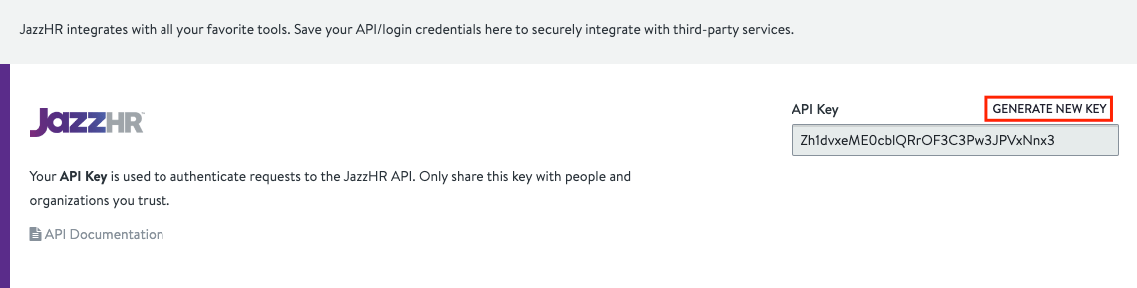
    If required, you can generate a new API key by clicking on the GENERATE NEW KEY.
    <Frame>
      <img className="rounded-md" style={{ margin: '0 auto', border: '1px solid #efefef' }} alt="Generate New Key" src="https://mintcdn.com/stackone-hub-docs-confluence-api-token-update/gCnVSZzD28kSlWtw/images/jazzhr/image4.png?fit=max&auto=format&n=gCnVSZzD28kSlWtw&q=85&s=39cbbe3e31ea2b4f435687582ab7691a" width="1137" height="288" data-path="images/jazzhr/image4.png" />
    </Frame>
  </Step>

  <Step title="Replace Existing Key">
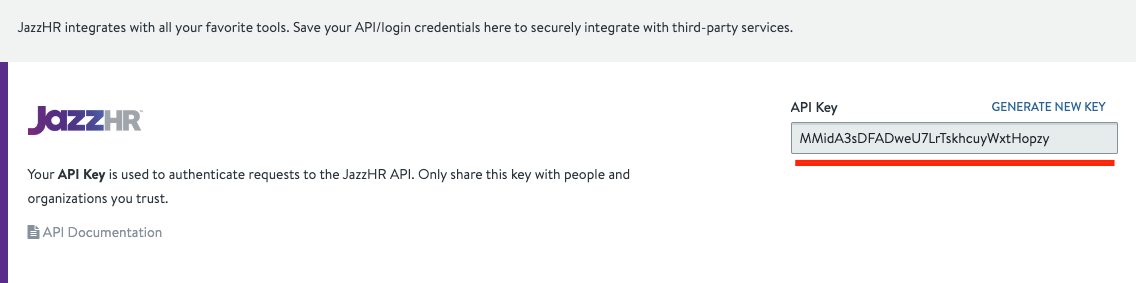
    After generating the new key, the existing key will be replaced with a new one.
    <Frame>
      <img className="rounded-md" style={{ margin: '0 auto', border: '1px solid #efefef' }} alt="New API Key" src="https://mintcdn.com/stackone-hub-docs-confluence-api-token-update/gCnVSZzD28kSlWtw/images/jazzhr/image5.png?fit=max&auto=format&n=gCnVSZzD28kSlWtw&q=85&s=9f484415fb1bdec2cd61baffb514fe3a" width="1136" height="283" data-path="images/jazzhr/image5.png" />
    </Frame>
  </Step>
</Steps>

NOTE: You can use the auto-generated API key if you don’t want to generate a new one.

## Connecting with StackOne

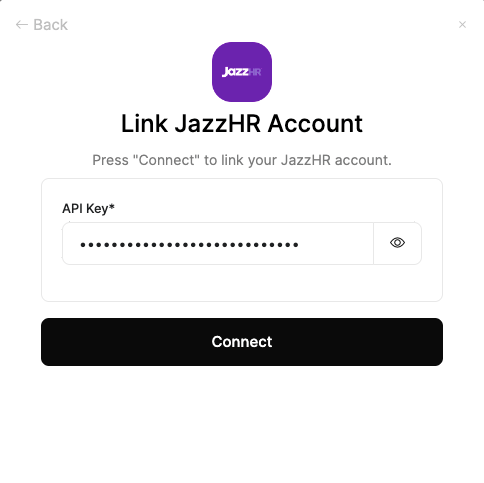
Upon reaching the Link Account page, enter the gathered details and proceed by clicking the Connect button.
<Frame>
  <img className="rounded-md" style={{ margin: '0 auto', border: '1px solid #efefef' }} alt="Link Account" src="https://mintcdn.com/stackone-hub-docs-confluence-api-token-update/gCnVSZzD28kSlWtw/images/jazzhr/image6.png?fit=max&auto=format&n=gCnVSZzD28kSlWtw&q=85&s=01d4ed16c8375d0736621d6ec1a40112" width="484" height="483" data-path="images/jazzhr/image6.png" />
</Frame>

<br />

Congratulations, you're all set! If you face any issues with the steps mentioned above,
please contact us by emailing [integrations@stackone.com](mailto:integrations@stackone.com). We're always here to assist you!

## Useful Links

<Card title="API Reference" icon="link" href="https://www.resumatorapi.com/v1/">
  [https://www.resumatorapi.com/v1/](https://www.resumatorapi.com/v1/)
</Card>
